Automate your deferred revenue schedules
Mayday Deferred Revenue Software




Our Deferred Revenue product is helping teams save days of work across the globe


"The way the new Deferred Revenue feature has been made is simple, but flexible, which is exactly how I was hoping it would be built. After providing feedback during the beta, I was able to manage all of the revenue scenarios I had encountered.
The team really listened to the feedback and thought through how revenue recognition can work easily."

"I was so excited to be part of the beta for their deferred revenue and prepayment modules. I confess that a bunch of work came up, which delayed me getting started.
Can't believe what I was missing! OH MY GOD. What a PRODUCT."

"The Mayday Deferred Revenue feature is simple, easy to use and very flexible, so it can handle any situation you throw at it, which was the case for our company.
Most invoices follow a different revenue timeline and Mayday handled them with ease, we will definitely be using this tool going forward."
How does Deferred Revenue save you time?
1: Identify relevant transactions in seconds
Mayday's AI-powered inbox scans all your transactions and surfaces which require deferred revenue schedules.

Set custom rules
Choose what transaction types (invoices, bank transactions & journals) and account codes you want Mayday to monitor.

Review with ease
Review transactions either individually, or in bulk, giving you full control and oversight.

.webp)
2: Apply recommended deferred revenue schedules
No more spreadsheets. Mayday calculates and recommends the correct deferred revenue schedule for every transaction.

Approve calculations
Easily review recommended schedules in your inbox and make edits where needed.

Validate your schedules
See all your deferred revenue schedules for the financial period in one clear view, so you can easily validate and approve.
3: One-click post your journals
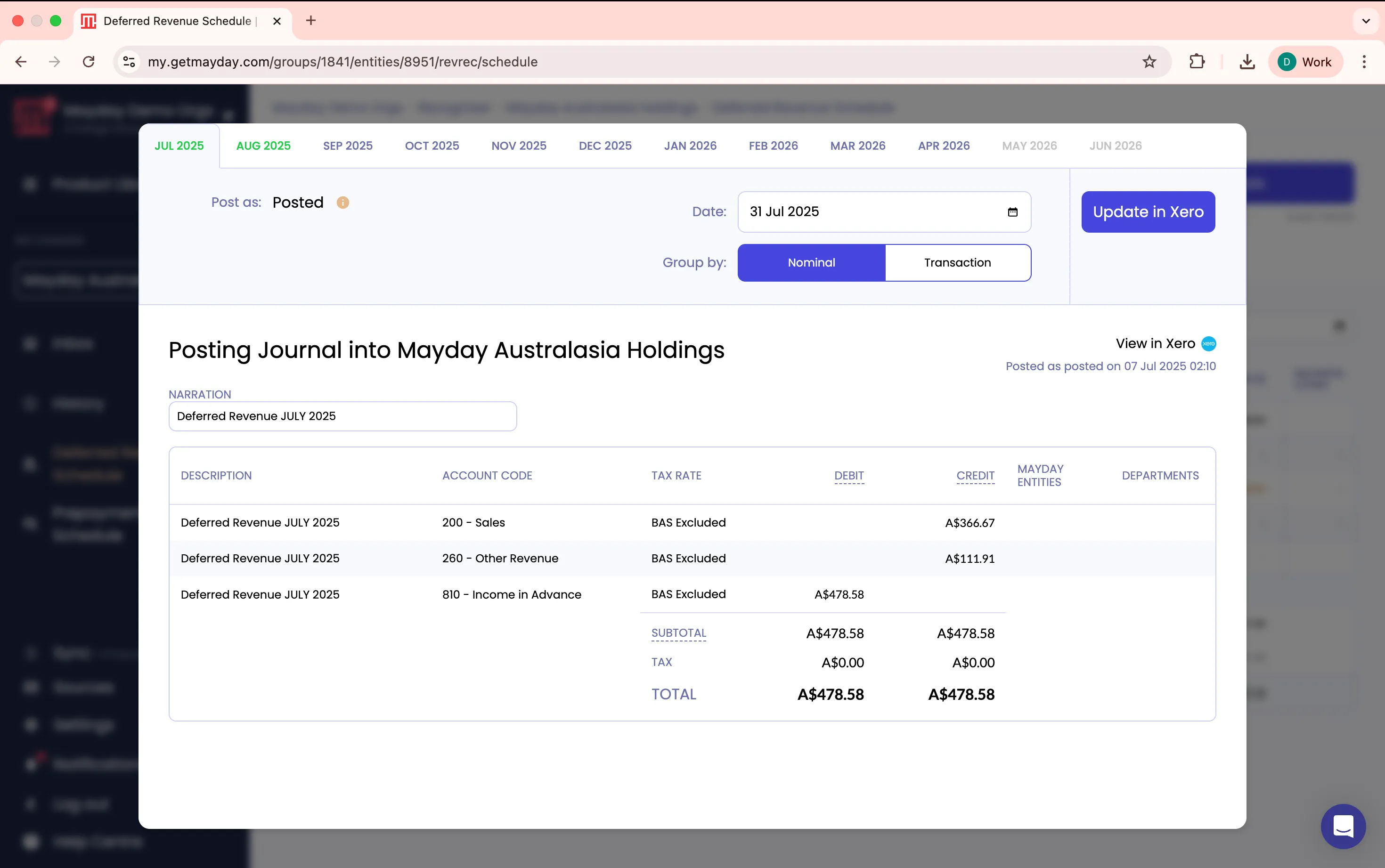
Once your schedules have been reviewed and you’re happy everything’s correct, post your journals to Xero or QuickBooks Online in a single click.

Post as draft or finalised
Decide whether to post at a transaction level or nominal level, depending on the level of detail you need.

Stay in sync
Visual indicators keep you on track: green for reconciled, gold for updates pending.
Deferred Revenue FAQs
What is Deferred Revenue?
Who is Deferred Revenue designed for?
How does Mayday identify transactions that need deferring?
Can teams review the schedules before posting?
How does Deferred Revenue help with month end?
Can Mayday post deferred revenue journals to Xero or QuickBooks Online?
How can Deferred Revenue help my company scale without an ERP?
What is deferred revenue accounting software?
What is deferred revenue and when is it recognised?
What's the difference between deferred revenue and accrued revenue?
How do you reconcile the deferred revenue balance to the schedule?
Deferred Revenue is Powered by Mayday AIR
Our AI-powered engine transforms how you handle month-end operations, helping you save hours and eliminate costly errors.
First, AIR applies recognised accounting principles to make intelligent decisions like "should these transactions be matched?" or "should this have deferred revenue treatment?"
Then, AIR applies your individual business context, learning what's typically done in your specific accounting files to suggest actions tailored to your workflows.
Mayday AIR is pre-trained on synthetic data and explicit customer consent, never on private customer data without permission.
Deferred Revenue is part of the ultimate month-end toolkit
Bring your month-end workflows into one place, so your team can close faster with fewer surprises.
CORE
Flux
Quickly explain anomalies in your P&L with the help of AI-generated commentary
Prepayments
Automate the creation and recognition of your prepayment release schedules
Accruals
Automate scheduling and journal posting of your recurring and ad hoc accruals
Deferred Revenue
Automate the creation and recognition of your deferred revenue schedules.
INTERCOMPANY
Balancer
Keep your intercompany accounts and AR/AP balances in sync across your files
Mayday HQ
Easily manage Chart Of Accounts and Tracking Categories across your group
BRAG
Reconcile transactions to other entities from within Xero’s bank rec dashboard
Recharger
Automate your intercompany and interdepartmental recharges
Start a completely free trial of Deferred Revenue today.
Or book a demo for a personalised walkthrough + Q&A.